As a web designer, I am always looking for services that offer me quality, reliability and excellent value for money. After trying several hosting providers, Namecheap has become my favorite. Not only do I use Namecheap for my own projects, but I also recommend it to all my clients and colleagues. Below, I will explain why Namecheap stands out among hosting providers and how you can sign up for a shared hosting plan along with a domain.
Advantages of Namecheap
1. Affordable Price One of the main reasons why Namecheap is my preferred choice is their competitive pricing. They offer a variety of plans to suit different budgets, without compromising on quality of service.
Reliability and Uptime Namecheap guarantees 99.9% uptime, which means that your websites will be available almost all the time. This is crucial for any online business, as an inaccessible website can mean loss of customers and sales.
3. Customer Support Namecheap's technical support is available 24/7 via live chat and support tickets. Their team is fast and efficient, helping to resolve any issues that may arise.
4. Ease of Use Namecheap's interface is intuitive and easy to use, even for those who are not tech savvy. This makes it easy to manage domains, hosting and other services.
5. Security Security is a priority for Namecheap. All plans include free SSL certificates, which ensures that the data transferred between your site and your users is protected.
Shared Hosting Plans
Namecheap offers several shared hosting plans to suit the needs of different types of users, from bloggers to small and medium-sized businesses:
How to Register a Shared Hosting Plan with a Domain at Namecheap
Registering a shared hosting plan along with a domain on Namecheap is a simple process. Here's how to do it step by step:
Step 1: Visit Namecheap's Website Go to Namecheap by clicking here which will take you directly to their shared plans page.
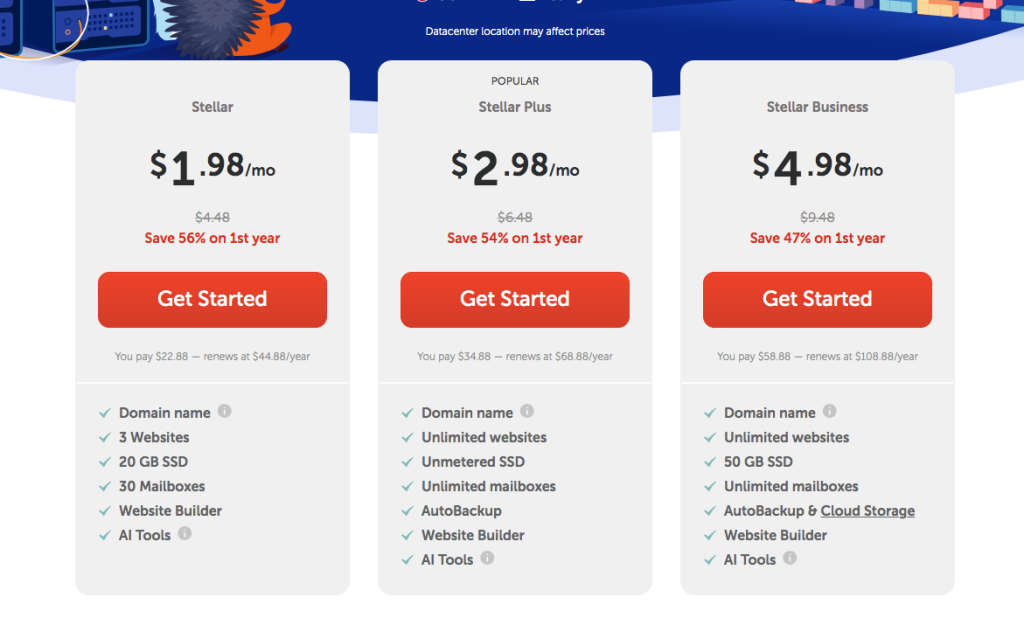
Step 2: Choose your Hosting Plan Select the shared hosting plan that best suits your needs (Stellar, Stellar Plus or Stellar Business) and click "Get Started". I recommend starting with at least the Stellar Plus Plan as it has AutoBackup, which is very important for any website.
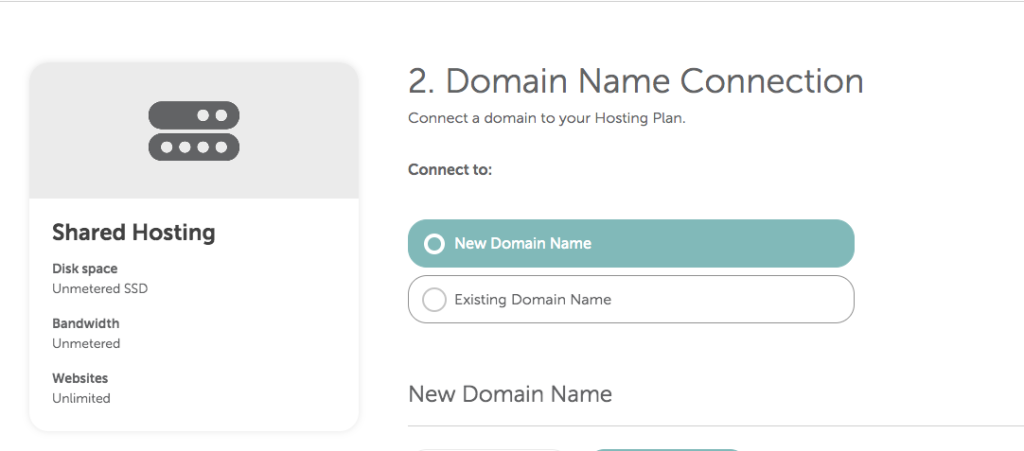
Step 3: Domain Registration On the next screen, you will have the option to search for and register a new domain name or use one you already have. Enter the domain name you want and check its availability. If it is available, add it to your cart.
Step 4: Order Setup Check your cart to make sure you have selected the correct hosting plan and desired domain. Here you can also choose to add extras, such as domain privacy protection and additional SSL certificates.
Step 5: Account Creation and Payment If you do not have a Namecheap account yet, you will need to create one. Then, enter your payment details and complete the purchase.
Step 6: Hosting Setup Once your purchase is complete, you will receive an email with details on how to access your control panel (cPanel). From there, you will be able to start configuring your website, install WordPress or other CMS, and manage your domain.
In Summary
Namecheap offers an unmatched combination of price, reliability and customer service, making it the ideal choice for any web designer. With their shared hosting plans and ease of domain registration, you can have your website up and running in no time. If you're looking for a reliable and affordable hosting provider, don't hesitate to try Namecheap - you won't be disappointed!